Understand business needs objectives
Propose tech stack, timelines architecture
Sprint-based development with regular demos
Final testing and go-live with complete documentation
Ongoing maintenance, upgrades scale-up
Understand business needs objectives
Propose tech stack, timelines architecture
Sprint-based development with regular demos
Final testing and go-live with complete documentation
Ongoing maintenance, upgrades scale-up

We help define the ideal stack
Our architects suggest best options
With estimation, milestones & approach
Flexible delivery model: fixed or dedicated

Get expert tech consultation at no cost.
Get Free Tech AdviceBrief us on your needs (tech stack, duration, etc.)
Receive matched profiles within 24–48 hours
Interview the candidates and choose the right fit
Kick off the project seamlessly with our support

Customer support has become an important part of delivering a positive digital experience. Customers expect quick answers, accurate information, and assistance whenever they need it. However, managing a large volume of support requests through manual processes can increase operational costs, create response delays, and put additional pressure on support teams.
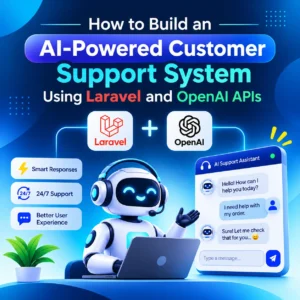
Artificial intelligence (AI) offers businesses a way to improve customer communication through automated conversations, intelligent query handling, and contextual responses. By combining Laravel’s backend development capabilities with OpenAI APIs, developers can build customer support systems that understand user questions and generate relevant responses.
An AI-powered support platform can answer frequently asked questions, retrieve information from company documents, collect customer details, create support tickets, and transfer complex requests to human representatives.
This article explains how to design and develop an AI-powered customer support system using Laravel and OpenAI APIs, including architecture, database planning, API integration, security, and deployment considerations.
Before writing code, developers should understand how the different components communicate.
Laravel acts as the application’s backend framework. It manages authentication, customer records, conversation history, API requests, business rules, and database operations. OpenAI APIs provide the language-model capabilities required to interpret questions and generate responses.
A typical system includes the following components:
The communication process generally follows this sequence:
Separating these responsibilities makes the application easier to maintain, test, and scale.
The first development stage involves setting up the Laravel application and its supporting services.
A new project can be created using the Laravel installer:
					laravel new ai-support-system
cd ai-support-system
Developers should configure the required database connection in the .env file. MySQL or PostgreSQL can be used for storing customer information, messages, and support records.
For applications expecting significant traffic, Redis can be introduced for caching and queue processing.
The next step is configuring the OpenAI API credentials. Add the following environment variables:
					OPENAI_API_KEY=your_api_key
OPENAI_MODEL=your_supported_model
The model should be selected according to the application’s response quality, latency, and budget requirements. Keep the API key on the server and never expose it in frontend JavaScript, public configuration files, or mobile application code.
Create a dedicated configuration file such as config/services.php entry:
					'openai' => [
    'key' => env('OPENAI_API_KEY'),
    'model' => env('OPENAI_MODEL'),
],
This approach allows the application to access configuration through Laravel’s configuration system rather than directly reading environment variables throughout the codebase.
A reliable customer support system requires structured conversation storage. Keeping customer messages and AI responses in a database makes it possible to retrieve previous discussions, monitor support activity, and investigate unresolved requests.
A practical database design can include four main tables.
Users: Stores customer account details, including name, email address, and authentication information.
Conversations: Stores conversation identifiers, customer references, status, and timestamps.
Messages: Stores individual customer and assistant messages, including their roles and associated conversation IDs.
Support Tickets: Stores issues requiring manual attention, including ticket status, assigned agents, priority, and resolution information.
For example, a messages table can contain the following fields:
Field | Purpose |
id | Unique message identifier |
conversation_id | Related conversation |
role | User, assistant, or system-generated record |
content | Message text |
created_at | Message creation time |
updated_at | Last update time |
Laravel migrations can be used to create these tables.
					php artisan make:model Conversation -m
php artisan make:model Message -m
php artisan make:model SupportTicket -m
A simplified messages migration might look like this:
					Schema::create('messages', function (Blueprint $table) {
    $table->id();

    $table->foreignId('conversation_id')
        ->constrained()
        ->cascadeOnDelete();

    $table->string('role');
    $table->longText('content');

    $table->timestamps();
});
In a production system, developers should also consider message retention policies, tenant ownership, database indexing, and access permissions. If the application serves multiple businesses, every conversation and knowledge-base record should be scoped to the correct tenant.
The OpenAI API is responsible for generating intelligent responses based on the information provided by the application.
For new text-generation projects, developers can use the OpenAI Responses API. It supports text inputs, generated text, structured outputs, and integrations with tools. Laravel’s HTTP client can communicate with the API without requiring a separate JavaScript backend.
Create a dedicated service class:
php artisan make:class Services/OpenAIService
The service class can contain the API communication logic:
					namespace App\Services;

use Illuminate\Support\Facades\Http;

class OpenAIService
{
    public function generateResponse(array $input): array
    {
        $response = Http::withToken(
            config('services.openai.key')
        )
        ->acceptJson()
        ->timeout(45)
        ->post('https://api.openai.com/v1/responses', [
            'model' => config('services.openai.model'),
            'instructions' => 'You are a helpful customer support assistant. '
                . 'Answer using the supplied business information. '
                . 'Do not invent company policies or product details.',
            'input' => $input,
        ]);

        $response->throw();

        return $response->json();
    }
}
This service provides a reusable integration layer. Controllers do not need to contain the API authentication or request-building logic.
The application can then extract the generated text from the response output. Since the Responses API returns a structured output array, developers should inspect message items and their content rather than assuming that the first output element always contains plain text.
A simple extraction method can be implemented as follows:
					private function extractText(array $data): string
{
    foreach ($data['output'] ?? [] as $item) {
        if (($item['type'] ?? null) !== 'message') {
            continue;
        }

        foreach ($item['content'] ?? [] as $content) {
            if (($content['type'] ?? null) === 'output_text') {
                return $content['text'] ?? '';
            }
        }
    }

    return 'I could not generate a response. Please try again.';
}
This provides a starting point for handling standard text responses. Production implementations should also handle refusals, incomplete outputs, unexpected response structures, and API errors.
After creating the OpenAI service, developers need an endpoint through which customers can submit messages.
Create a controller:
php artisan make:controller ChatController
A simplified controller method can validate the message, retrieve the conversation, and send the request to the AI service.
					use App\Models\Message;
use App\Services\OpenAIService;
use Illuminate\Http\Request;

class ChatController extends Controller
{
    public function send(
        Request $request,
        OpenAIService $openAI
    ) {
        $validated = $request->validate([
            'conversation_id' => 'required|integer',
            'message' => 'required|string|max:4000',
        ]);

        $conversation = $request->user()
            ->conversations()
            ->findOrFail($validated['conversation_id']);

        Message::create([
            'conversation_id' => $conversation->id,
            'role' => 'user',
            'content' => $validated['message'],
        ]);

        $history = $conversation->messages()
            ->latest()
            ->limit(10)
            ->get()
            ->reverse()
            ->map(fn ($message) => [
                'role' => $message->role,
                'content' => $message->content,
            ])
            ->values()
            ->all();

        $result = $openAI->generateResponse($history);

        $answer = $this->extractText($result);

        Message::create([
            'conversation_id' => $conversation->id,
            'role' => 'assistant',
            'content' => $answer,
        ]);

        return response()->json([
            'answer' => $answer,
        ]);
    }
}
This example assumes that authenticated users have a conversations() relationship and that the relevant message model relationships are configured. The extraction method shown earlier should also be included in the controller or moved into a dedicated response parser.
For a production implementation, use a transaction or an explicit message status so that a failed API request does not leave the conversation in an unclear state. Also, validate that the conversation belongs to the authenticated customer before processing it.
One of the most important requirements of a useful customer support assistant is access to accurate business information.
A general AI model may understand language, but it does not automatically know a company’s current product prices, refund policies, service availability, delivery conditions, or account-specific information.
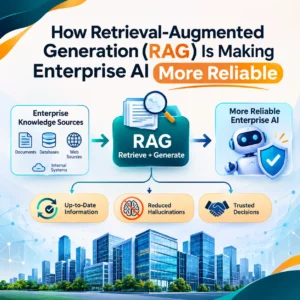
To solve this problem, developers can implement Retrieval-Augmented Generation (RAG).
RAG retrieves relevant information from an external knowledge base and supplies it as context when generating a response.
The workflow generally includes:
For example, a customer might ask, “Can I return a product after 15 days?”
The application can retrieve the company’s return policy and pass the relevant section to the AI model. The assistant can then explain the applicable conditions without relying on general assumptions.
The system should also be instructed to acknowledge when the knowledge base does not contain enough information. This is particularly important for financial, legal, healthcare, and other sensitive customer-support situations.
A customer may ask several related questions during one support session. An AI assistant should therefore understand the context of previous messages.
Laravel can maintain this conversation history through the database. For every new request, the backend retrieves a limited number of recent messages and includes them in the next API request.
However, sending the complete conversation history indefinitely can increase token usage, response time, and API costs.
Developers can manage this through:
The Responses API also supports stateful interaction patterns. Developers can choose between managing conversation history within Laravel or using supported API conversation-state features. Application-level storage is useful when the business needs direct control over retention, access, auditing, and customer data.
AI automation should not eliminate access to human support. Certain customer issues require investigation, judgement, or actions that an AI assistant should not perform independently.
Examples include:
A useful system can identify these situations and change the conversation status to needs_human.
Laravel can then create a support ticket and notify the appropriate team.
For example:
					SupportTicket::create([
    'conversation_id' => $conversation->id,
    'user_id' => $conversation->user_id,
    'subject' => 'Customer requires human assistance',
    'status' => 'open',
    'priority' => 'normal',
]);
The support dashboard can display open tickets, conversation history, customer details, and the reason for escalation.
Human agents should be able to take ownership of a conversation, add internal notes, and mark the issue as resolved. This creates a practical combination of automated assistance and human decision-making.
API communication can take longer than normal database operations. If every customer request waits for multiple external services, the application may experience slower response times.
Laravel queues can move time-consuming tasks into background processing. For example, ticket notifications, email confirmations, conversation summaries, and analytics updates can be handled asynchronously.
A job can be generated using:
php artisan make:job SendSupportNotification
The job can be dispatched after a support ticket is created:
SendSupportNotification::dispatch($ticket);
Laravel supports queue drivers such as database and Redis, allowing developers to choose an appropriate backend based on application requirements.
Caching can also improve performance. Frequently accessed public information, such as approved FAQs or product descriptions, may be cached to reduce repeated database queries.
However, developers should avoid caching personalised answers without appropriate customer and conversation boundaries. One customer’s private information must never be returned in another customer’s session.
For AI response generation, background processing can be particularly useful when the frontend supports a pending state, polling, or real-time updates through broadcasting.
Security is essential because a customer support platform may process personal details, account information, and business records.
Developers should implement several protective measures.
API key protection: Store credentials in environment configuration and never expose them to the browser.
Authentication and authorisation: Ensure customers can access only their own conversations and support tickets.
Input validation: Restrict message size, validate identifiers, and reject unexpected request formats.
Rate limiting: Limit repeated chat requests to reduce abuse and unexpected API usage. Laravel provides rate-limiting facilities that can be applied to chat endpoints.
Sensitive information handling: Avoid sending unnecessary personal information to external AI services. Define retention, access, and deletion policies according to applicable privacy requirements.
Prompt-injection protection: Treat customer messages and retrieved documents as untrusted input. Do not allow instructions inside those messages to override the application’s approved behaviour or grant access to internal systems.
Tool permissions: If the assistant can access external services through function calling, validate every requested action on the server. A model-generated function call is a request for the application to act, not proof that the action is authorised.
Cost controls: Set token budgets, message limits, model-selection rules, and usage monitoring. Track API usage by customer or tenant where appropriate.
For sensitive or high-impact actions, require explicit user confirmation and, where necessary, human approval.
Before launching the application, developers should test its behaviour across different customer scenarios.
Important testing areas include:
A useful evaluation dataset should contain realistic customer questions and expected support outcomes. Developers can use it to compare model responses after changing prompts, models, or knowledge-base content.
During deployment, configure production environment variables, database backups, HTTPS, queue workers, logging, and monitoring. Laravel queue workers should be managed through a process supervisor or an appropriate hosting platform.
Developers should also monitor response latency, failed requests, ticket escalation rates, customer satisfaction, and API spending. These measurements help identify where the system needs improvement.
Building an AI-powered support platform requires more than connecting a chatbot to an external API. It involves backend architecture, database design, API integration, security controls, knowledge management, and ongoing performance improvements.
Appeak Technology can help businesses explore custom Laravel development, AI integrations, API-based automation, and web application solutions based on their operational requirements.
A well-planned solution can support multiple communication channels, connect with existing CRM or helpdesk platforms, retrieve approved business information, and provide a structured process for transferring complex requests to human agents.
The right implementation depends on the company’s support volume, technical environment, data requirements, and expected customer experience.
Yes. Laravel can manage the backend, customer authentication, database operations, conversation history, and business logic. By integrating an AI API such as OpenAI, developers can create a chatbot that understands questions and generates contextual responses.
The OpenAI Responses API is a suitable option for new text-generation applications. It supports text input, generated responses, structured outputs, and tool-based integrations. Developers should select a supported model based on their application’s requirements.
Yes. Developers can implement Retrieval-Augmented Generation (RAG) to retrieve relevant information from company documents, FAQs, and product databases. The retrieved content can then be supplied to the model as context.
Laravel can store messages in a database and retrieve recent conversation records whenever a customer submits a new question. Developers can also summarise older messages to reduce context size and API usage.
Yes. A Laravel application can detect requests requiring additional assistance and create support tickets. Human agents can then review the conversation, investigate the issue, and continue helping the customer.
Combining Laravel with OpenAI APIs provides developers with a flexible foundation for building intelligent customer support applications. Laravel handles backend operations, user management, databases, security, and integrations, while AI models help interpret customer questions and generate useful responses.
By adding a structured knowledge base, conversation memory, human handoff, and performance monitoring, businesses can create support systems that are more responsive and easier to manage.
The most effective implementation is not one that automates every interaction. It is one that provides accurate information, protects customer data, recognises its limitations, and connects users with human support whenever necessary.